✦ Scheduling · Attendance · Payroll · HR

One system, from the roster to the payslip.

Schedule the month, check who actually turned up, approve the hours and run payroll — without anybody retyping anything between them. Underneath it all sits the record of every person: contracts, documents, reviews and conduct.

Android app Web console Works with terminals Clocks in offline
KA
Monday 12 October
Good morning, Kwesi
TODAY · MORNING
06:00 – 14:00
Main factory · Packing line 2
Clock in
Starts in 9 min. You’ll need your face and to be at Main factory.
This week31h
Leave left9 days
Checking you’re at Main factory
Finding your location…
Your clock-in time is the moment you tapped.
Smile
A real person, not a photo
You’re in
05:51
9 min early
Main factoryAt the site
FaceLive photo taken
Shift06:00 – 14:00
Clocked in 07:58
On site · face checked
Payslip ready
Tax & pension applied
One photo of a real handwritten hospital roster, turned into a working month — and the same hours carried through to payslips.
180
shifts scheduled
100%
of shifts covered
<1 min
from photo to roster

How a month runs

Four steps, one set of data. Nobody retypes an hour between the roster and the bank file.

1

Schedule the month

Rotations, minimum rest, overtime caps and role coverage are enforced as the month is built. Publish once and everybody has it on their phone.

2

People clock in

On their own phone, inside the site and with a live face check — or at a terminal by the gate. Either way it lands on the same timesheet.

3

You approve the hours

Late starts, early finishes and missed clock-outs come to you to decide. Only approved hours go further, and a closed month locks behind you.

4

Payroll goes out

Tax and pension under your country's rules, allowances under their own — then payslips, the statutory schedules and a file for the bank.

✦ Phone or terminal

On a phone, or at the gate

Some people clock in on their own phone. Some walk past a fingerprint or face terminal at the gate. ShiftSync takes both, and every punch lands on the same timesheet.

1On the phone — inside the site, with a live face check, so nobody clocks in for a friend.
2At the terminal — the terminals you may already have send their punches straight in, through a small bridge on site.
3One timesheet — whichever way they came in, you approve one set of hours.
07:58
Kwesi Appiah
✓ VERIFIED
✦ The manager's console

Your whole workforce, on one screen

Who is in, who is late and what needs you — the moment you open it. In the browser or on a desktop, live as people clock in.
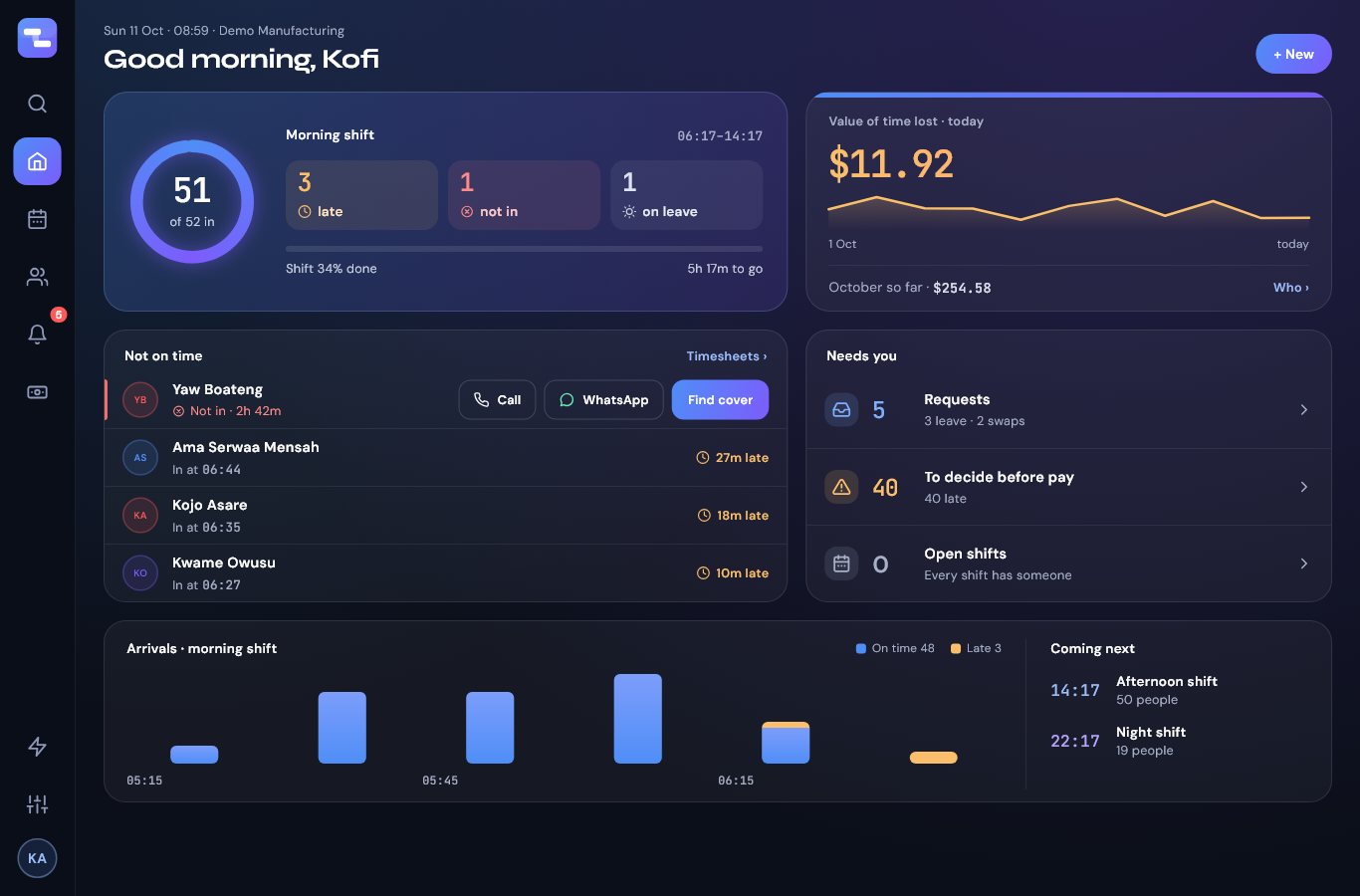
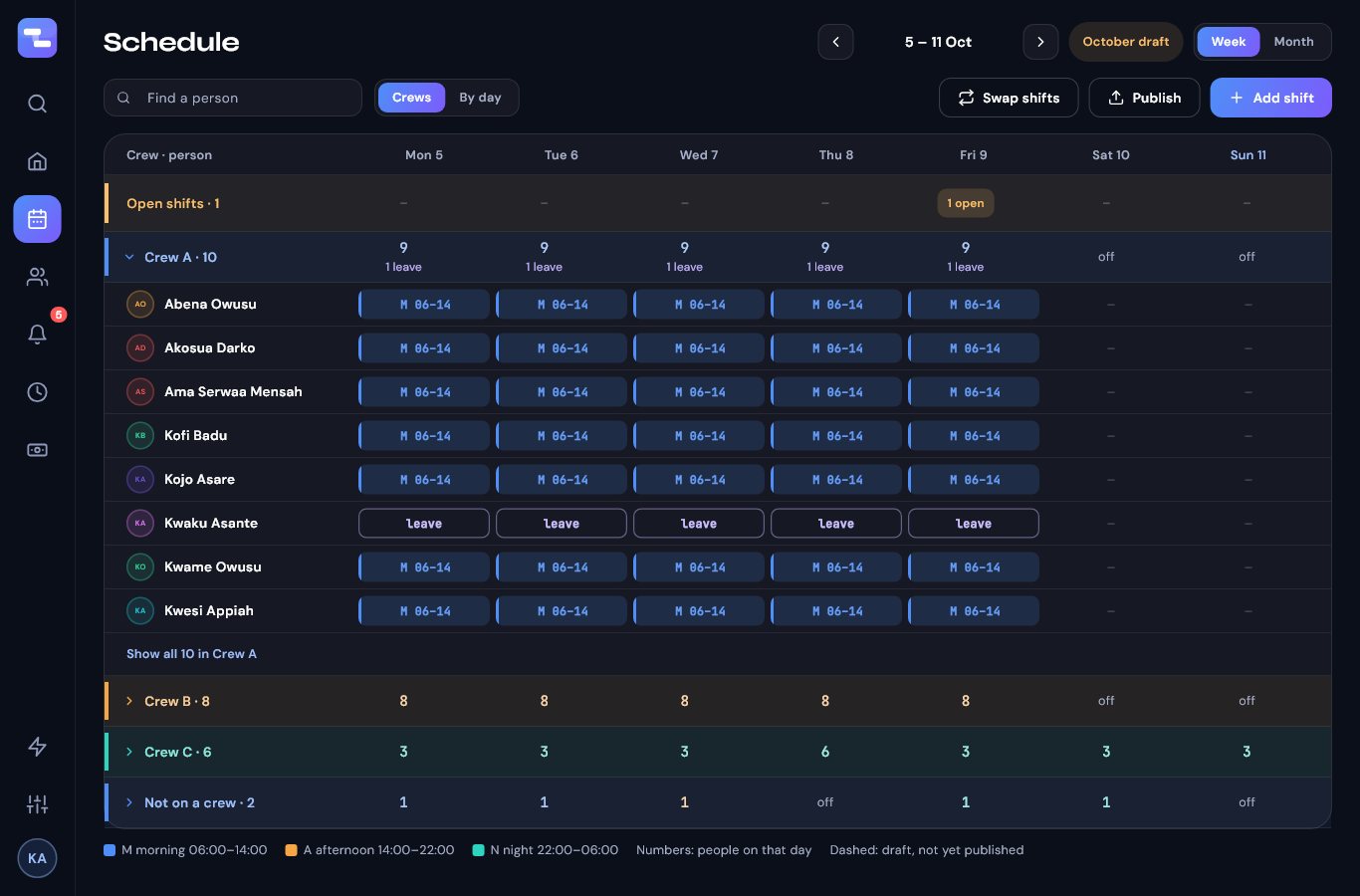
The ShiftSync console's home page: who is in, who is late, what needs a decision The ShiftSync schedule: crews by day, with leave and open shifts
Who is in, right nowEveryone expected on this shift, who arrived, who is late and who has not turned up — with a call or a WhatsApp a tap away.
What needs youLeave and swaps to approve, days to decide before pay, open shifts to fill. Nothing waits unseen.
Time lost, as moneyLate starts and early finishes add up across the month, so the cost of lost time is a number, not a feeling.
✦ Set up in an afternoon

Start from what you already have

No migration project and no weeks of configuration. Bring the duty roster that is already on the wall and the staff list that is already in a spreadsheet, and ShiftSync builds the rest around them.

1Photograph the roster — or just type the rules in plain words: “morning and afternoon are 6-hour shifts, 4 days on 1 off; nights are 12 hours.”
2Check what it read — shift times, rotations, rest rules and staffing levels come back as settings you can change. You see every rule before anything is scheduled.
3Bring in the people — the whole workforce from your spreadsheet. Names are all that is required; the rest can follow.

One system, from hire to payslip

Attendance, payroll and the employment record are not add-ons bolted onto a rota — they are the same system, priced as one thing.

Plan

the month, before it happens

Auto-scheduler

Rotations per shift, longest run of days, minimum rest, overtime caps and role coverage — enforced on every month it builds.

Crews & fixed teams

Crews swap days and nights on a cycle while the back office keeps Monday to Friday, and coverage counts only the slots that need filling.

Swaps, leave & open shifts

People trade shifts, ask for leave and pick up extra shifts in the app; you approve with one tap, and the roster updates itself.

Run

the day, as it happens

Clock-in you can trust

Inside the site, with a live face check — a smile or a turn of the head, so a photo is not enough. Faked locations and borrowed phones are flagged for you.

Attendance terminals

Fingerprint, face and card terminals at the gate feed the same timesheet as the phones, through a small bridge on site.

Timesheets you approve

Clean days approve in one go; late starts, early finishes and missed clock-outs come to you, with the reason the person gave.

Pay & keep

the month, after it ends

Payroll with local rules

Tax and pension worked out under your country's rules, allowances and bonuses under their own, then payslips and a file for the bank. Rates are dated, so last March still works out to last March's figures.

Ghana built in · more countries coming

The people record

Contract, job, department, next of kin, pay history and documents — held once per person, and seen only by those who should.

Reviews, conduct & expiry alerts

Appraisals people can answer, warnings recorded properly, and licences or papers running out flagged a month ahead.

The record behind every person

A roster tells you who is on tonight. The rest of running a workforce is everything a roster does not say — and it is usually in a drawer.

Employment record — start date, contract type and end date, job, department, next of kin. Leave is worked out from the start date instead of guessed.
Papers on file — contracts, IDs and right to work, uploaded once and kept with the person rather than in an inbox.
Nothing lapses quietly — a licence, document or contract running out warns you a month ahead, again at a week, and when it has gone. A required licence takes its holder off the roster the day after.
Joining and leaving — the same checklist every time, so the induction that matters and the pass that must come back are not remembered by one person.
Conduct, recorded properly — a verbal warning that expires, a written one that does not, and the date each was given.
Departments & supervisors — a department's leave and flagged timesheets go to its supervisor, who runs the team without seeing anybody's pay.
✦ See the time you pay for

Minutes add up

347paid hours a month

An example: 160 staff, each 15 minutes late twice a week. That is 347 hours a month of paid time — at any hourly rate, real money. ShiftSync shows it to you person by person, with the reason they gave, so you decide what is excused.

A worked example from typical figures, not a promise of savings.

Built for teams that work in shifts

Hospitals & clinics Ward rotations, night cover, licences that must not lapse.
Factories & plants Crews on a cycle, terminals at the gate, supervisors per department.
Offices Fixed hours, leave balances, reviews and contracts.
Restaurants & hotels Split shifts, weekend cover, people who come and go.
Retail & security Many sites, attendance you can check, one payroll.

Questions people ask

What if there is no internet at the site?

People can still clock in. The phone finds its location without data, does the face check, and keeps the punch with its true time until there is a connection — then sends it by itself.

Which phones does it work on?

The employee app is on Android today. Managers use the console in any modern browser, or on a Windows desktop.

Can somebody clock in for a friend, or from home?

Clock-in needs a fresh location inside the site and a live face check — a smile or a turn of the head, so a photo is not enough. A faked location, an unfamiliar phone or a face that does not match is flagged on the timesheet for you to look at.

Which countries does payroll work in?

Scheduling, clock-in, timesheets and the people record work anywhere. Payroll has Ghana's tax and pension rules built in today; other countries' rules are being added one at a time.

Do we need fingerprint terminals?

No. Most teams clock in on their phones. If you already have terminals at the gate, they can send their punches to the same timesheet.

Who can see pay and personal details?

Only the people who should. Supervisors run their team's leave and timesheets without seeing anybody's pay, and employees see only their own. Read the privacy policy.

One simple price

Scheduling, attendance, payroll and the full employment record — every part of it, for one price per employee each month.

Per employee, per month Every feature included No setup fee Cancel anytime
Get started →
Create your company, invite your team with one code, and run your first month today.